
Improved API keys
· Mathis Van Eetvelde
Improved API Keys
Last week we improved the way API keys work in Notifox. This blog post will tell you everything you need to know about how they work, what they're for and how you can use them to improve security.
We've also recorded a YouTube video about it if watching is more your style!
Legacy key
If you've previously used Notifox and you go to the API keys view, you'll see the table now contains an extra type column. This column indicates what the type of the API key is. Possible options are Legacy, Live and Temp.
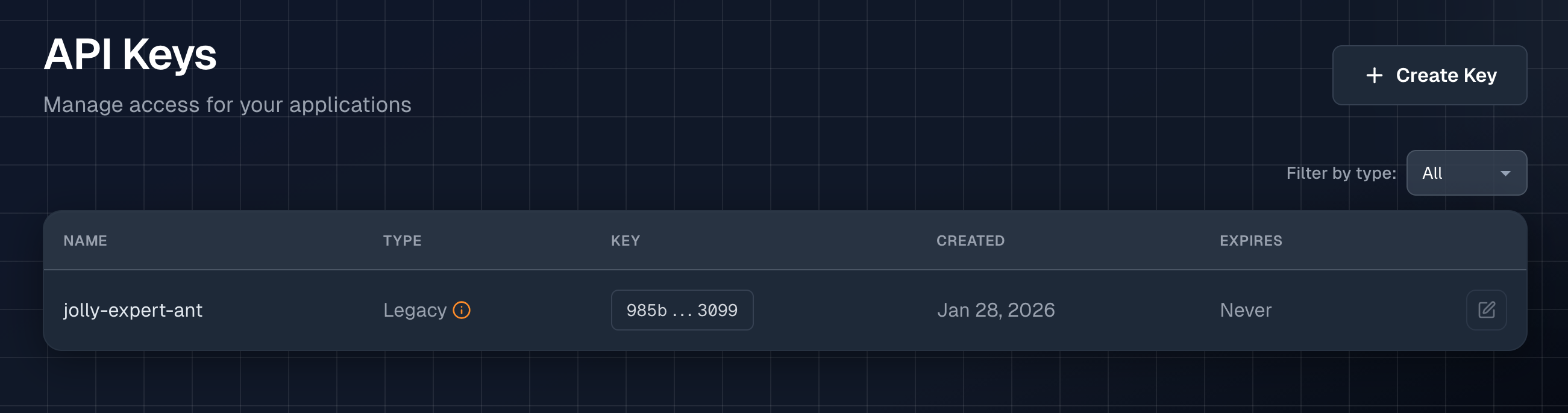
If the key was generated before the 10th of February, it will say Legacy. This indicates that the key is a UUID key such as the following: dc746828-6bab-43d7-b01d-cc74eeb9759b. We found that because UUIDs are everywhere nowadays, it was difficult to recognize the API key among other variables, keys and settings. The new Live and Temp keys have a different format (that we'll get to later in this post).
Because we've moved away from the UUID API key, it is no longer possible to generate one. But we will maintain compatibility and ensure they keep functioning as expected going forward. However we do recommend that you change the Legacy key out for a new Live key when most convenient for you as they offer several improved security features.
Live key
When you want to create a new production API key, click the + Create Key button in the top right of the API keys view. When you click this button a window will appear that asks you to name the key you are about to create, as well as set an expiration date.
These keys are called Live keys.
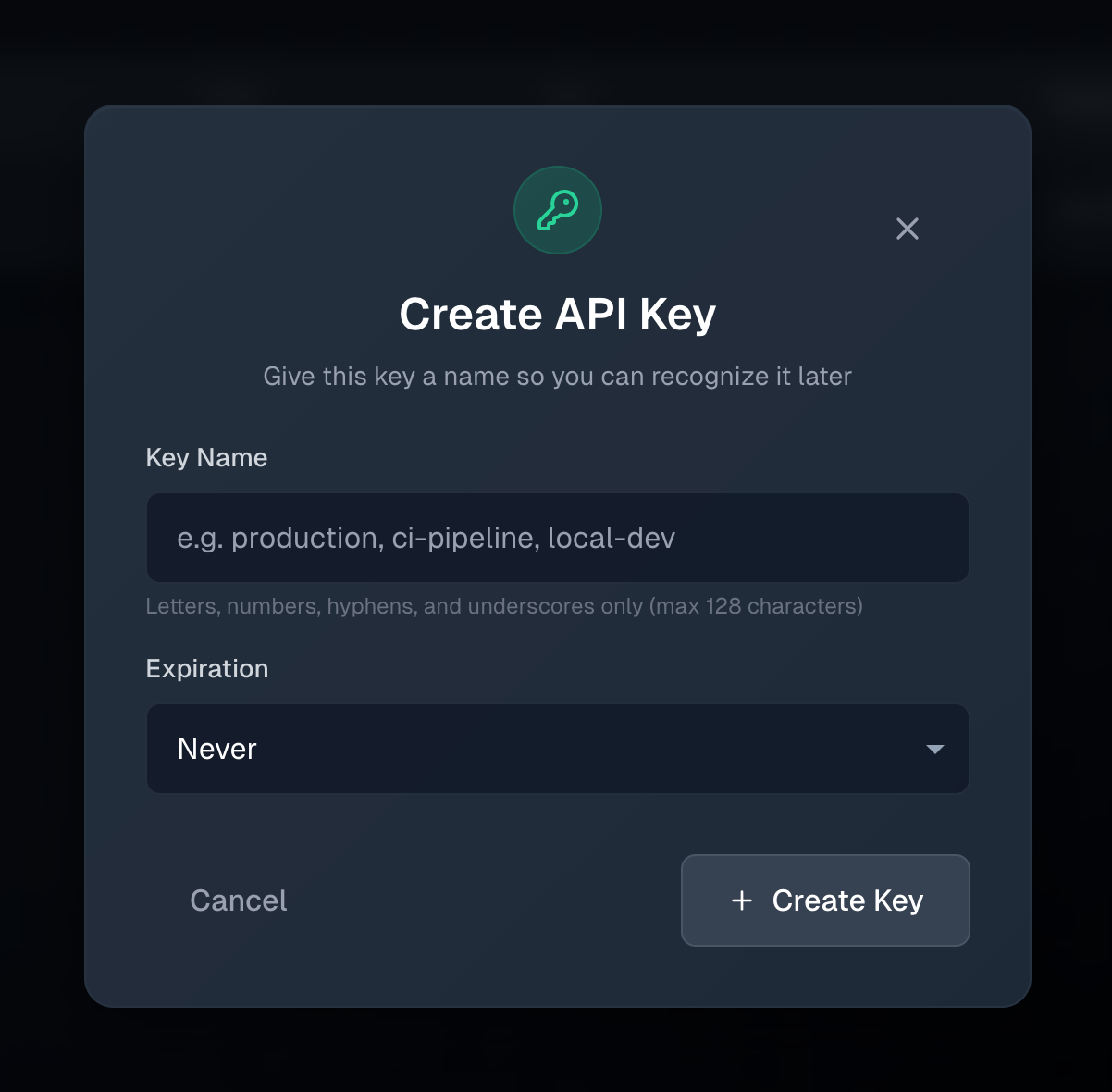
We decided that it was important to be able to name your API keys as it clears up a lot of confusion about what the key is actually doing, and where it is used. The name can be up to 128 characters and contain letters, numbers, hyphens and underscores. Here are some ideas for valid key names: production-us-east-1, staging, github-actions, cicd, etc.
The options for the expiration date are:
30 days90 days1 year2 yearsNever
When the key reaches the expiration date, it can no longer be used to send alerts or otherwise interact with your Notifox account.
When you click on the + Create Key button, the key will be created with your desired name and expiration date. After the creation has been successful it will show you the key itself.
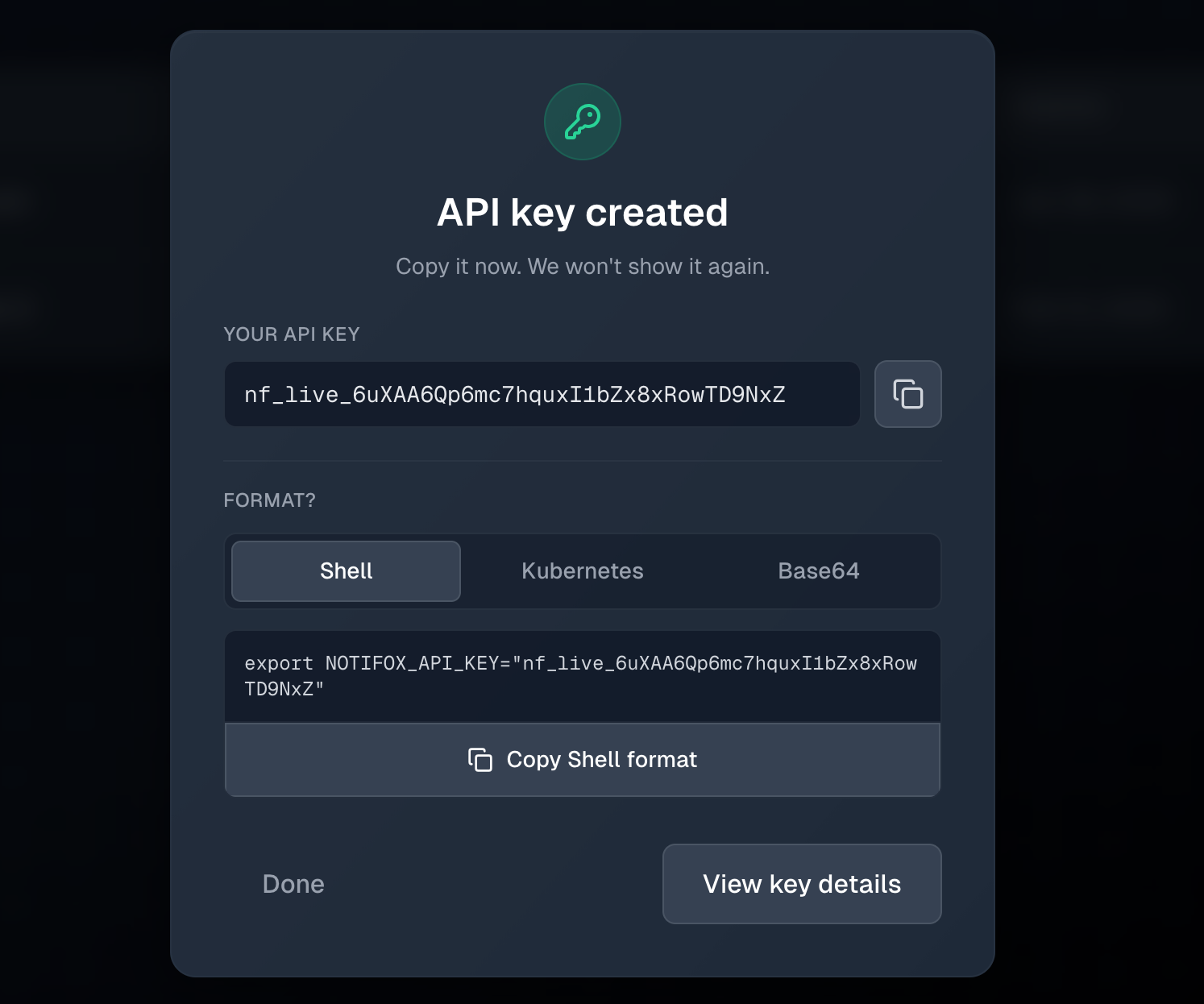
As you can see, the live (production) keys are now prefixed with nf_live to indicate that this is a Notifox key of type Live. This allows you to better identify your keys.
At the top of the modal you have the option to copy your key in plain text. This is useful if you want to enter this key into a Github Actions secret, or AWS SSM environment variable.
For ease of use, we have also provided you with the option to copy your key in several other formats such as:
- Shell (exports the key in bash)
export NOTIFOX_API_KEY="nf_live_Tg2cnK76HXgzRnUYTqIxuQlroYRRtVM7"- Kubernetes Secret
apiVersion: v1
kind: Secret
metadata:
  name: notifox-api-key
type: Opaque
data:
NOTIFOX_API_KEY: bmZfbGl2ZV9UZzJjbks3NkhYZ3pSblVZVHFJeHVRbHJvWVJSdFZNNw==- Base64 encoding
bmZfbGl2ZV9UZzJjbks3NkhYZ3pSblVZVHFJeHVRbHJvWVJSdFZNNw==Once you've copied your key, you can either click Done or View Key Details.
Key details
When you click on View Key Details you'll be brought to a separate page.
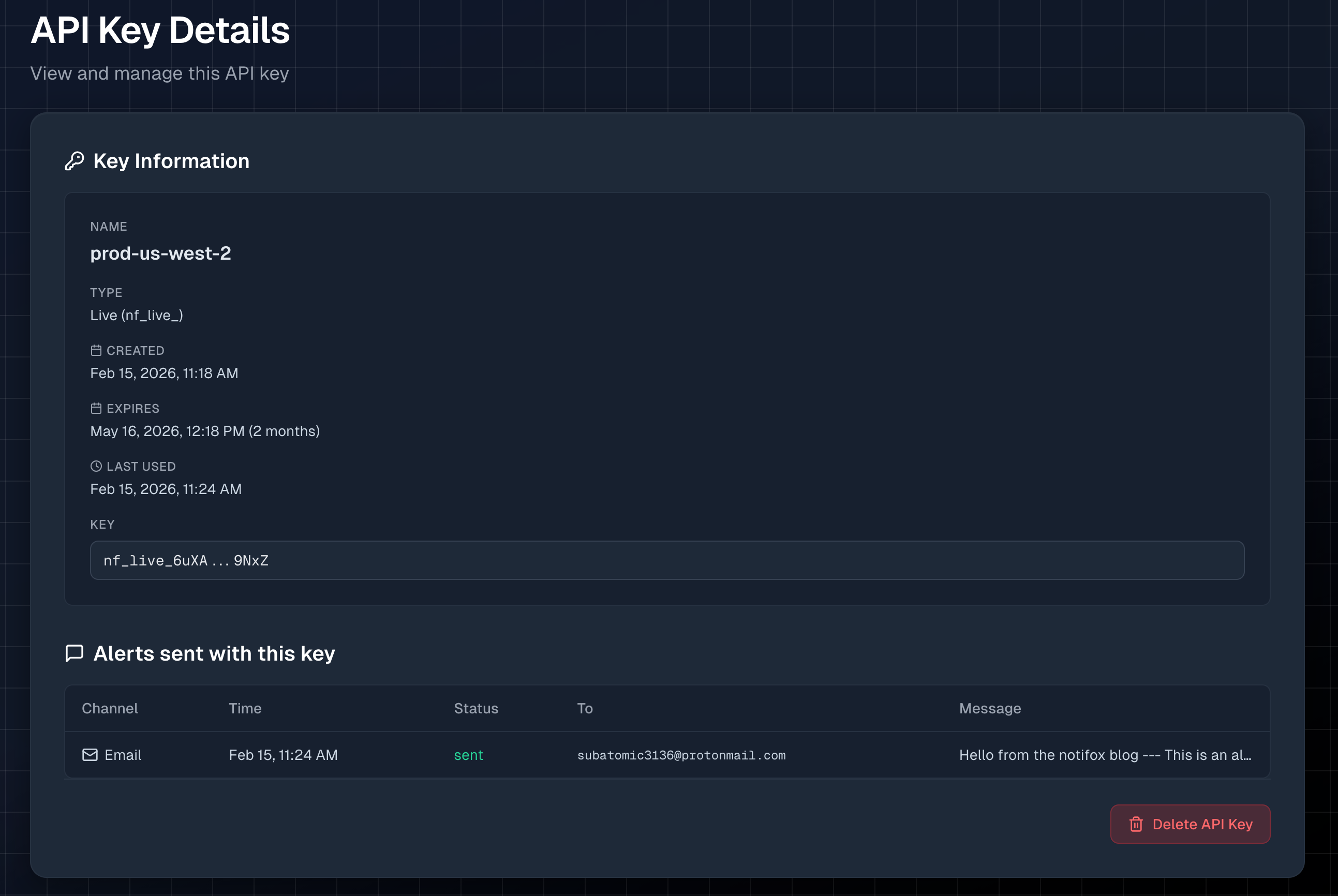
In the key details, you can find more information about your newly created keys such as the key Name, Type, Creation Date, Expiration Date (and how many days until it reaches its expiration date), when the key was Last Used and the Key & suffix.
You can now also see what messages were sent using this specific API key. This in combination with the Last used date gives you a great idea of if it's safe to delete the key, which you can also do on this page using the big, red Delete API key button.
Temp Keys
The last new key type is the Temp key. This is a special key that can only be created through the Interactive Send view. As you might have guessed by the name, the Temp key is a temporary key that is only valid for 5 minutes after it's creation OR 10 messages, whichever comes first.
This is done to preserve the easy onboarding, while disallowing the front end to be able to retrieve full API keys.
In order to create a Temp API key, go to the Interactive Send view. Select your Audience, Channel and Message. This will generate the command with the $NOTIFOX_API_KEY environment variable in the Authorization header. If you have the $NOTIFOX_API_KEY environment variable set in your terminal (or your .zshrc or .bashrc files for example), this will work out of the box. However if you do not have that key set, you can click the green Generate temporary key button. This will prepend the generated command with export NOTIFOX_API_KEY=nf_temp_xm234... (or the Windows equivalent). If you click on the orange Copy button and paste it into a terminal (or the CMD), you should now be able to send an alert.
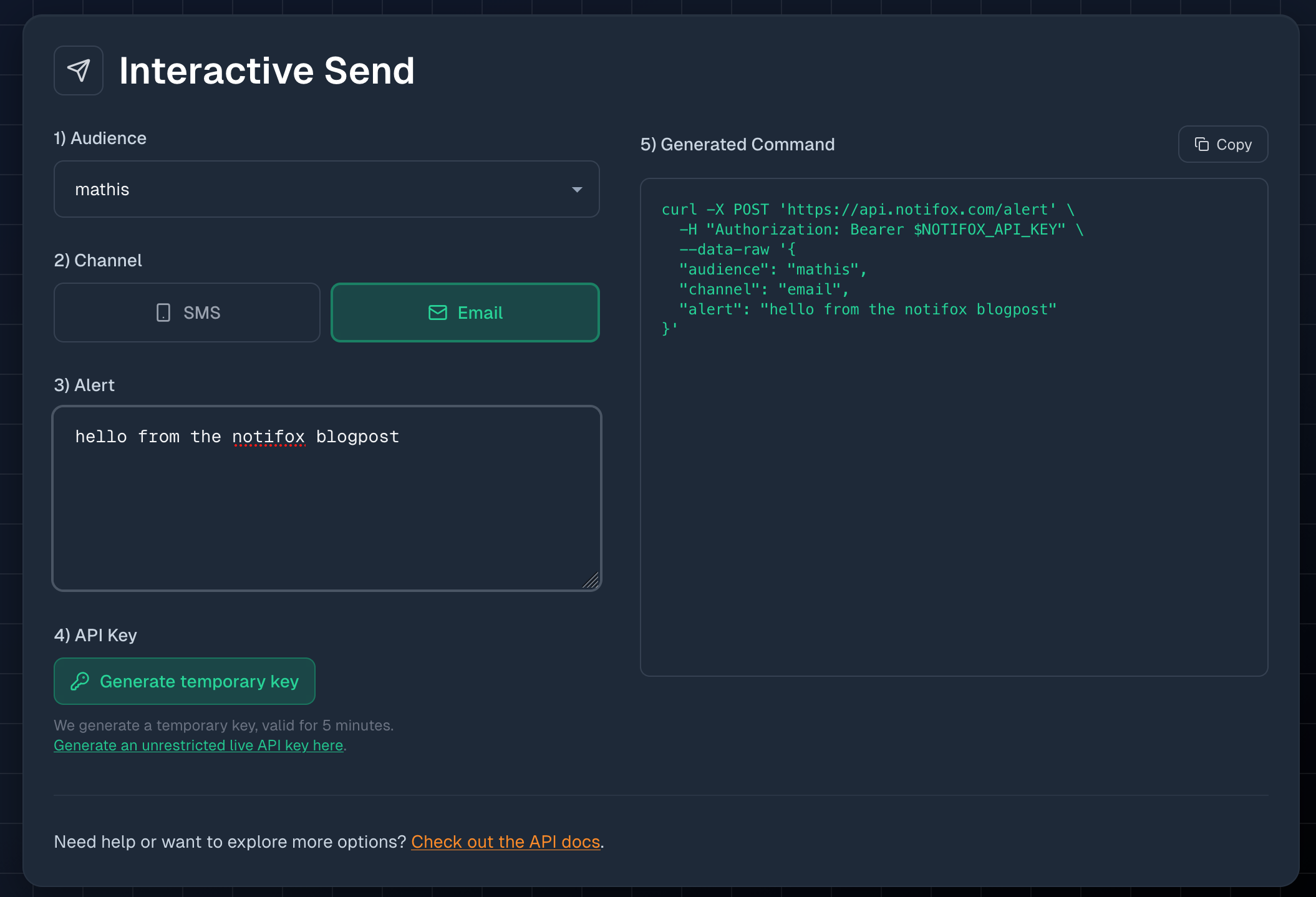
As stated above, you can send a maximum of 10 alerts in a 5 minute timeframe. After sending 10 alerts or after 5 minutes have passed (whichever comes first), the key will no longer be usable. This is done to minimize the possible blast radius if this key were to be leaked. Because of the limitations of this key, it is important not to use this key in a production setting, or you will soon wonder why you are not receiving notifications.
The Temp API key will also show up in the API Keys view. Because the Temp API keys expire so quickly we have made it extra easy to delete the API key by adding a Quick Delete button next to the Details button. Preventing you from having to go into the API Key details page for every Temp key.

Conclusion
Notifox API keys now come in three types: Legacy (existing UUID keys, still supported), Live (named keys with optional expiration and per-key audit logs), and Temp (short-lived keys for trying the Interactive Send flow). If you still use a Legacy key, we recommend swapping it for a Live key when convenient so you can name it, set an expiration, and see exactly where it is used. For quick tests from the console, use the temporary key; for scripts, CI, and production, use a Live key.